Is Flodesk better than Mailchimp and is it worth the money?
Since moving over to Flodesk, I’ve been asked a lot about whether I’d recommend it. So today I’m going to talk about my experience with Flodesk, whether it’s worth the money and the alternatives out there. If you’re thinking of starting a newsletter, do check out my post on how to make money from your newsletter and create your first free download in under an hour.
AD/AFFILIATE LINK: My review of Flodesk is mixed but if you do decide to go with it, I have an affiliate link which I’ll individually label when use.
What is Flodesk?
Flodesk is a mailing list platform that is specifically designed for those who want really beautiful newsletters and pop-ups. It’s taken off in the blogger community for that reason. It works in a similar way to any other newsletter provider but there are some advantages and disadvantages.
What I think the benefits of Flodesk are.
So why are bloggers so crazy about it? First of all, the templates are really great. I always wondered how some people’s newsletters looked so sleek and professional-and now I know. Rather than having to build their own templates with designers, lots are using Flodesks and dragging and dropping their content in. My newsletters look so much better than on Mailchimp and I think the pop-ups and sign up forms look great too (here’s an example of mine). With Mailchimp, you need to use a third-party plugin to create a newsletter pop-up (I think?) but the Flodesk ones are really easy to install on your site and look great.
Have I said they look great already? To be honest that is the essence of Flodesk: their templates look great and they really do work. My sign up rate has really increased since using Flodesk (but I have put way more effort into my newsletter) and my open rate has hugely too.
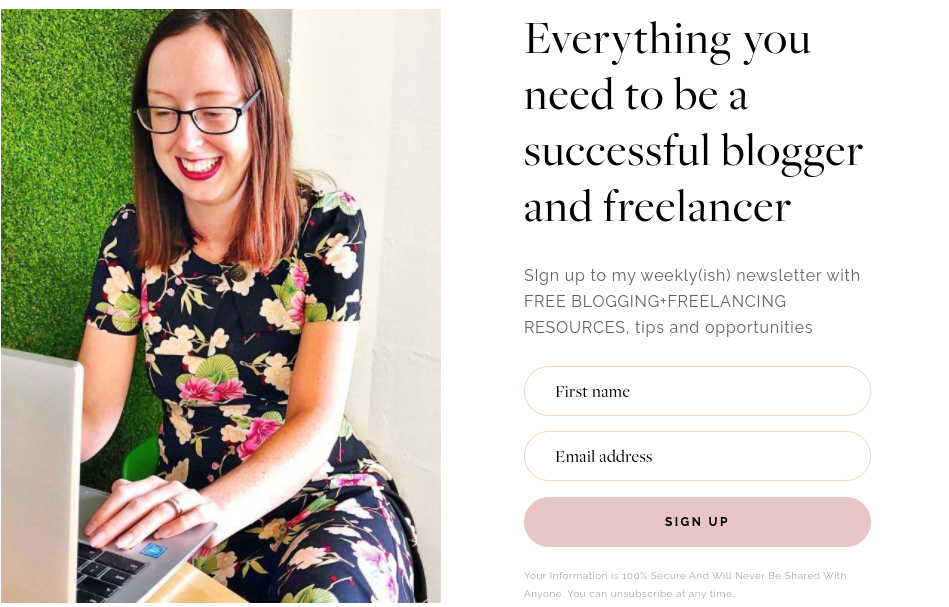
You can’t deny that’s a beautiful looking sign up form.
However, if your newsletter is simply about your written word and you’re not fussed about appearance or using images then don’t bother with Flodesk. Use something like Substack because it’s free and has lots of handy features to support writers.
Flodesk also comes with a handy Facebook group called ‘Flodesk Insiders’ and the team themselves at Flodesk is very active in the group. So if you have a problem then you can ask the team directly. They also launched a free newsletter marketing course for members so they’re really throwing lots of resources at it. Another thing I like about Flodesk is there’s no cap on subscribers: once you hit 2000 Mailchimp gets expensive quickly. Flodesk is the same price whatever your newsletter list.
On the one hand, I’m inclined to tell you to stick with Mailchimp until you get to 2000 so you don’t have to pay. On the other hand, I want to warn you that it is a nightmare trying to change your newsletter subscribers over. This isn’t Flodesk’s fault (simply download your list via Mailchimp and export into Flodesk-it’s a five-minute job) but if you link to your newsletter everywhere, it is a bastard to change every link. I still have people sign up every day via Mailchimp via a mystery link that I can’t find. I feel like an archaeologist digging for bones and I still can’t find that bloody link.
So if you’re starting to work on your newsletter, consider switching before you start sharing it everywhere. Sign up to some other newsletters on Flodesk so you can get a feel for it: such as my A Balanced Belly gut health newsletter, The Bloglancer newsletter Or sign up for the (AD-AFFILIATE LINK) 30-day free trial and just have a play with it.
What I don’t like about Flodesk
There are a few things I don’t like about Flodesk. Firstly, it’s really not built for people who have multiple sites. They argue you should create a new account for each site which I don’t like and just seems like a way to get more money to me: so you can only have one logo and one Instagram feed installed to show in your newsletters. I didn’t realise this until after I signed up and I probably wouldn’t have done so since I have three other sites. But that’s probably not an issue for most people.
It’s also quite a new platform so they’re constantly thinking about workarounds. For example, if I share my sign up newsletter link on social media, it will pull the text and image of ‘Sign up to Flodesk now’ rather than my newsletter specifics which is a little bit confusing. In the Facebook group, they suggested working around this by screenshotting your sign up form and sharing that image instead with the link instead. To be fair, that works fine but it seems a bit silly they don’t have the technology to change that.
Is Flodesk worth the money?
Flodesk is $38 a month but most people use an affiliate code -AD-AFFILIATE LINK (like mine) to get 50% off and end up paying $19 a month (this is for life).
I feel like no one actually pays $38 a month and it’s just inflated so when you see it’s only $19 with an affiliate code you think: OH MY GOD, WHAT AN AMAZING DEAL- I NEARLY ENDED UP PAYING $38 BUT NOW I CAN GET THE WHOLE THING FOR $19.
Like when I look at designer clothes and then when looking at Joules afterward (yes I’m 35-I look at Joules now!), my brain is convinced £70 for a handbag made of straw is actually very reasonable.
Is it worth $38? No. Is it worth $19. Yes, I do think so: I don’t have to worry about teetering on the edge of too many Mailchimp subscribers, my newsletter looks so much better and it is a lot easier to use than Mailchimp. I’m largely happy I switched but I wish it was easier to have multiple mailing lists on it.
However, if I wanted to create a newsletter that was just lots of tips and advice, I’d jump on Substack instead. For me, I need images to showcase my recipes or ebook images but not everyone does.
Also, for me, my newsletters have been important but not everyone is that way. So don’t feel as if you need an all singing all dancing newsletter if a simple one will do the job.
You can sign up via my affiliate link here which gets you a 30 day trial and 50% off, or you can just ask one of the other 27000 bloggers (not real stat) who also have an affiliate link for Flodesk!